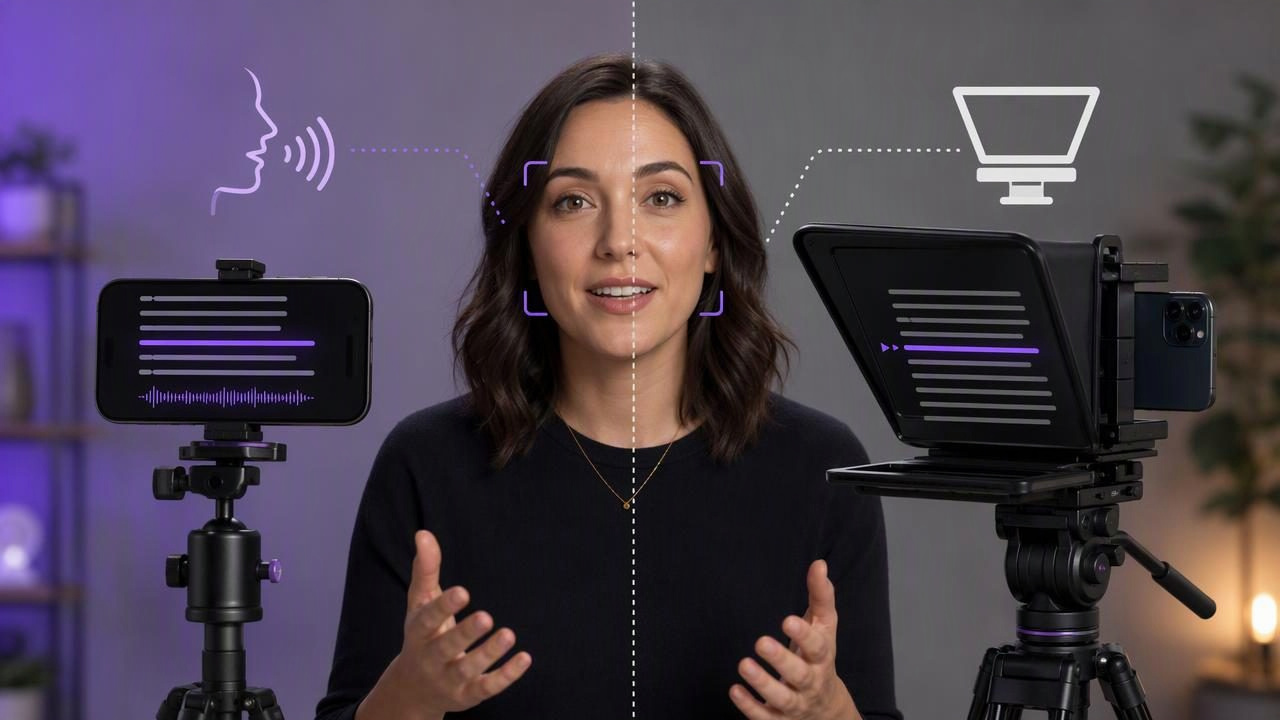
Choosing between a voice tracking teleprompter vs hardware teleprompter is less about which option is universally better and more about how, where, and how often you record. A hardware teleprompter can create an excellent eye-line for polished productions, while a voice-following teleprompter app can make scripted iPhone video faster to produce with fewer physical accessories.
Both tools solve the same basic problem: helping you deliver a script without repeatedly looking away from the lens. However, their setup, portability, reading experience, and limitations differ considerably. Understanding those differences can help creators, presenters, educators, founders, and social media teams choose a practical script-to-video workflow.
What Is a Voice Tracking Teleprompter?
A voice tracking teleprompter displays your script on a screen and advances the words as it recognizes your spoken delivery. Instead of setting one scrolling speed and trying to match it, you speak at a natural pace and the script follows along.
On an iPhone, this approach generally keeps script reading, camera recording, and video creation close together in one mobile workflow. It is particularly useful when your pace changes between takes, when you need to pause for emphasis, or when you are recording a script with unfamiliar names, technical terms, or longer explanations.
Voice tracking is not the same as automatic perfection. Recognition can be affected by language support, device capability, background noise, unclear speech, major script changes, or talking far from the phone. A creator should still prepare the script carefully, review the text before recording, and have a fallback scrolling mode available when a fixed pace is more appropriate.
What Is a Hardware Teleprompter?
A hardware teleprompter usually uses a reflective glass panel, often called a beam splitter, positioned in front of a camera lens. A phone, tablet, or monitor displays mirrored script text below or above the glass. The presenter reads the reflection while looking directly toward the camera lens behind the glass.
Hardware teleprompters range from compact phone rigs to larger studio systems designed for professional cameras and external monitors. Their primary advantage is lens alignment: the script can sit very close to the actual camera lens, which can reduce visible side-to-side eye movement.
That benefit comes with additional equipment. You may need a compatible rig, mounting hardware, a stable tripod, a separate script display, power for multiple devices, and space to position everything safely. Setup can be worthwhile for recurring productions, but it may be excessive for a quick vertical video recorded at a desk or on location.
Voice Tracking Teleprompter vs Hardware Teleprompter at a Glance
| Factor | Voice Tracking Teleprompter | Hardware Teleprompter |
|---|---|---|
| Portability | Usually works with a phone-based recording setup. | Requires a rig, reflective glass, and usually a support system. |
| Script pace | Can follow spoken delivery when voice tracking is supported. | Often depends on manual operation or preset scrolling speed. |
| Eye-line | Script is near the phone camera, but placement matters. | Script can be reflected directly in front of the lens. |
| Setup time | Typically shorter for solo creators and mobile recording. | Usually longer because equipment must be mounted and aligned. |
| Best use case | Short-form content, explainers, updates, and quick retakes. | Studio interviews, broadcast-style pieces, and repeatable sets. |
| Potential limitation | Speech recognition and reading accuracy can vary by conditions. | Bulk, cost, glare, and extra setup can slow down production. |
How Reading Pace Changes the Decision
Reading pace is one of the most important differences between these approaches. With a traditional hardware teleprompter, someone may operate the scroll manually, or the presenter may use a fixed-speed scroll. This can work very well when a producer is available or when the script has been rehearsed enough to establish a predictable pace.
For a solo creator, fixed scrolling can create an awkward trade-off. If the text moves too quickly, you may rush. If it moves too slowly, you may pause unnaturally while waiting for the next line. A voice tracking teleprompter can reduce that pacing pressure because your delivery determines the progression.
Consider a founder recording a two-minute product update. They may want to pause after a key point, correct a phrase, or slow down for a feature explanation. In that situation, voice tracking can be more forgiving than a continuous scroll. By contrast, a presenter delivering a rehearsed five-minute keynote in a controlled studio may benefit from the precise lens alignment and larger text display of a hardware teleprompter.
Eye Contact: Camera Placement Matters More Than You Think
Neither setup automatically creates natural-looking eye contact. The result depends on where the text appears relative to the lens, how large the text is, how quickly it moves, and how much your eyes need to travel between lines.
With a hardware teleprompter, the reflected text sits directly in front of the lens. This is why the format is common in broadcast environments. However, very large text or a wide line length can still make eye movement noticeable. Keep lines short and avoid filling the screen with dense paragraphs.
With an iPhone teleprompter workflow, place the script as close to the camera area as the interface allows. Use a comfortable font size rather than oversized text. If the text is too large, your eyes may visibly scan across each line; if it is too small, you may squint or lean forward.
Practical rule: Write for the camera, not for a document. Short sentences, one idea per line, and clear pauses usually look more conversational than long written paragraphs.
A Concrete Example: Recording a 60-Second Tutorial
Imagine you are recording a vertical 60-second tutorial for social media. Your script explains three steps, includes one product name, and ends with a simple call to action. You are filming alone on an iPhone at home.
A hardware teleprompter could give you a close-to-lens eye-line, but you would first need to mount the phone, attach and align the glass, set up the script display, mirror the text if required, and make sure the rig is stable. That may be reasonable if you film ten tutorials in the same space every week.
For a single timely video, a voice tracking teleprompter may be more efficient. You can break the script into short sections, rehearse each section aloud, and let the text follow your speech where supported. If you pause to emphasize a step, the script does not necessarily race ahead at a preset speed.
The limitation is that you should not assume voice tracking will handle every condition equally well. Record in a quieter room, speak clearly, and test the exact language and delivery style you intend to use. If tracking is inconsistent, switch to timed or fixed-speed scrolling and rehearse until your delivery matches the pace.
Script Preparation for Either Teleprompter Type
Strong results begin before you press record. A teleprompter makes a script easier to read, but it cannot turn dense, overly formal writing into natural speech. Edit your script for how it sounds aloud.
- Use short lines: Aim for one thought per line so your eyes move less while reading.
- Write contractions: “You’ll” and “we’re” often sound more natural than formal alternatives.
- Mark pauses: Add a blank line or a slash where you want to breathe or change emphasis.
- Spell difficult words phonetically: This can help you avoid hesitating on names or technical terms.
- Remove filler language: Cut openings such as “I just wanted to quickly” unless they add meaning.
- Read it aloud once: If a sentence is hard to say, rewrite it before recording.
Audio and Lighting Checks Before You Record
A teleprompter setup should not distract from audio quality. Before filming the full script, record a short test with the exact camera position, lighting, and microphone arrangement you plan to use. Listen for room echo, air conditioning, traffic, handling noise, or clothing rustle.
Keep the camera stable and position the lens near eye level. Light your face from the front or slightly to one side, while avoiding reflections on hardware teleprompter glass. If you use a hardware rig, check whether the glass introduces glare from windows, lamps, or bright screens.
For iPhone recording, confirm the framing before beginning. Vertical framing suits many social platforms, while horizontal framing may be more suitable for longer YouTube videos or presentations. Avoid changing orientation mid-session because it can complicate editing and resizing later.
When a Hardware Teleprompter Is the Better Choice
A hardware teleprompter is often the stronger option when lens-perfect eye-line is a priority and the filming environment is stable. It may suit teams producing executive announcements, training modules, interviews, webinars, or repeatable studio content.
It is also useful when a producer or operator can manage the scroll speed. That person can follow the presenter’s delivery, pause when needed, and prevent the script from becoming the presenter’s responsibility. Large displays can also make longer scripts more comfortable to read from a distance.
Still, hardware does not remove the need for rehearsal. Poor posture, overly fast reading, or long dense lines can look unnatural even with a professionally aligned beam splitter.
When Voice Tracking Is the Better Choice
A voice tracking teleprompter is often a practical choice for creators who record independently, travel frequently, or need to publish quickly. It can support a lighter creator workflow because the script and recording process remain close together on the same device.
This format is especially useful for frequent short videos: social updates, course clips, product walkthroughs, internal messages, sales introductions, and educational explainers. It can also make retakes simpler because you can restart a section without rebuilding a larger camera rig.
For an iPhone-focused workflow, CueCam’s guide to recording video while reading a script provides a useful reference for setting up a script, camera position, pace, and a brief audio check before filming.
Make the Choice Based on Your Production Reality
The best answer to the voice tracking teleprompter vs hardware teleprompter question depends on your constraints. Choose hardware when you have a consistent filming location, want the closest possible lens alignment, and can justify a more involved setup. Choose voice tracking when speed, portability, flexible pacing, and solo iPhone recording matter most.
Whichever option you choose, focus on the fundamentals: write for speech, position the camera thoughtfully, test your audio, rehearse your pace, and record a short sample before the final take. Those habits will improve your delivery more reliably than any single piece of equipment.
